
Access to fast and reliable internet has become a fundamental requirement in modern society. However, billions of people worldwide still lack reliable connectivity, especially in rural and remote regions. Traditional internet infrastructure such as fiber optic cables and cellular networks can be expensive and difficult to deploy in sparsely populated areas.
To address this challenge, SpaceX launched a revolutionary satellite internet project called Starlink. Starlink aims to provide high-speed, low-latency internet globally using thousands of satellites orbiting the Earth. Unlike traditional satellite internet systems that rely on a few large satellites far from Earth, Starlink uses a constellation of small satellites in Low Earth Orbit (LEO). This design dramatically improves performance and coverage.
About Starlink
Starlink is a satellite broadband internet system developed by SpaceX. The project involves launching thousands of small satellites into Low Earth Orbit (about 550 km above Earth) to form a massive network that delivers internet services directly to users.
The key objective of Starlink is to:
- Provide high-speed internet globally
- Serve remote and rural areas
- Deliver low latency compared to traditional satellite internet
- Create a resilient global communication infrastructure
The satellites communicate with ground stations and user terminals to provide internet access almost anywhere on Earth.
How Starlink Satellite Internet Works
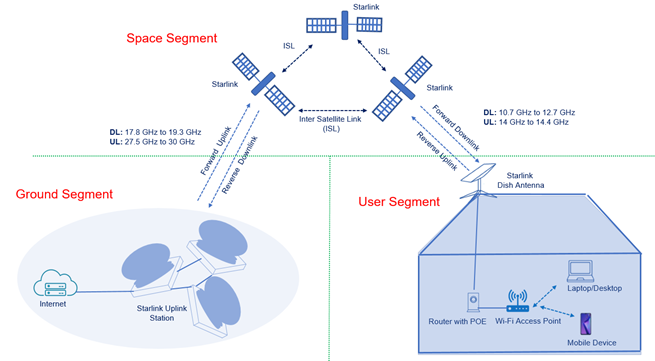
The Starlink system consists of three main components:
- User Terminal (Dish)
- Starlink Satellites
- Ground Stations / Internet Gateways
Let’s understand the working step-by-step.
1. User Terminal (Starlink Dish)
Customers install a Small Satellite Dish Antenna, commonly called the Starlink Dish.
This dish:
- Automatically aligns with satellites
- Uses Phased-Array Technology
- Tracks satellites as they move across the sky
The dish connects to a Wi-Fi router inside the home, providing internet access to devices like laptops and smartphones.
2. Communication with Satellites
When a user sends data (such as loading a website):
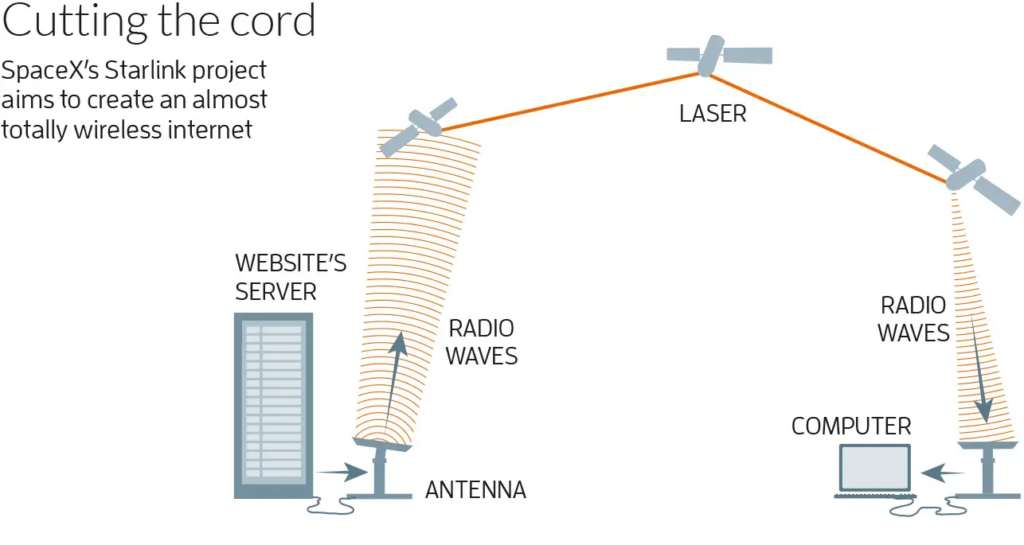
- The request travels from the User Device →Router →Starlink Dish.
- The dish transmits the signal to a Starlink Satellite in Low Earth Orbit.
- The satellite forwards the data either to:
- Another satellite using laser links, or
- A ground station connected to the internet backbone.
Because the satellites are only ~550 km above Earth, the signal travels much faster compared to traditional satellite systems.
3. Satellite-to-Satellite Communication
Newer Starlink satellites are equipped with Optical Inter-Satellite Links (laser communication).
This allows satellites to:
- Communicate directly with each other
- Route internet traffic across space
- Reduce Dependence on Ground stations
For example:
User in the middle of the ocean → Satellite A → Satellite B → Ground station → Internet Server.
This makes global coverage possible.
4. Ground Stations and Internet Backbone
Ground stations connect the satellite network to the global fiber internet infrastructure.
The data flow looks like this:
User Device → Starlink Dish → Satellite → Ground Station → Internet Server → Response → Satellite → Dish → User Device.
This process happens in milliseconds, allowing fast browsing and video streaming.
Why Low Earth Orbit is Important
Traditional satellite internet providers such as Viasat and Hughes Network Systems rely on satellites in Geostationary Orbit (GEO) at about 35,786 km above Earth.
This causes high latency.
Typical latency:
- GEO Satellite Internet: 600-700 ms
- Starlink LEO Satellites: 20-40 ms
Lower latency makes Starlink suitable for:
- Video Conferencing
- Online Gaming
- Real-Time Applications
Advantages of SpaceX Satellite Internet
1. Global Coverage
Starlink can provide internet access almost anywhere on Earth, including:
- Rural Areas
- Mountains
- Deserts
- Oceans
- Aircraft and Ships
This helps bridge the digital divide.
2. High-Speed Internet
Starlink currently offers speeds between:
50 Mbps – 250 Mbps
Future improvements may increase speeds beyond 1 Gbps.
3. Low Latency
Because satellites are closer to Earth, latency is much lower than traditional satellite systems.
This enables:
- Smooth Video Calls
- Cloud Gaming
- Real-Time Communication
4. Quick Deployment
Building fiber networks across rural areas can take years.
Starlink only requires:
- A Dish
- Power Supply
- Clear Sky View
This makes it extremely fast to deploy.
5. Disaster Recovery
Satellite internet remains operational when terrestrial infrastructure fails.
It has been used during:
- Natural Disasters
- War Zones
- Emergency Communications
Disadvantages of Starlink
Despite its benefits, the system has several limitations.
1. High Initial Cost
Users must purchase a Starlink hardware kit.
Typical costs include:
- Dish and Router
- Installation
Monthly subscription fees are also higher than many fiber services.
2. Weather Sensitivity
Satellite signals can be affected by:
- Heavy Rain
- Snow
- Storms
Although modern systems mitigate this, performance may degrade during extreme weather.
3. Space Debris Concerns
Thousands of satellites increase concerns about:
- Orbital congestion
- Space debris
- Collision risks
Space agencies are monitoring these issues closely.
4. Astronomical Interference
Astronomers have raised concerns that Starlink satellites reflect sunlight and interfere with telescope observations.
SpaceX has attempted to reduce this by adding:
- Sunshades
- Darker satellite coatings
5. Limited Bandwidth per Satellite
Each satellite can serve only a limited number of users.
In densely populated regions, speeds may decrease due to network congestion.
Patent Technical Landscape
Patent Document Over Time