



INTRODUCTION
In today’s digital era, the number of network users is rising rapidly, leading to increased demand for network traffic. As traffic grows, monitoring becomes a top priority to ensure smooth and efficient user services. This is especially important and complex in large networks, where traffic monitoring is critical but challenging. Higher traffic also increases the risk of network attacks, which can affect both performance and security.
A successful attack can disrupt the entire network, causing financial and operational losses for organizations and service providers. Breaches also threaten user privacy and can result in data misuse, creating serious risks and potential leaks of confidential information. Packet sniffing is an important tool for network monitoring, enabling administrators to observe network activities and identify weaknesses. This blog analyzes network traffic using the Wireshark tool, a widely used packet sniffer that captures, reports, and analyzes network traffic to help identify and address issues.
WHAT IS PACKET SNIFFING?
Network sniffing, also known as packet sniffing, is a process of scanning the data packets transmitted over a computer network. The packet sniffing process can be done by a special software tool or hardware known as a packet sniffer, also referred to as a network analyzer or a packet analyzer. The packet sniffing is used for various purposes, the data packets comprising different types of traffic sent over a network, such as to capture user authentication traffic, capture chat messages traffic, capture VOIP call traffic, and capture files during transmission over the network.
It is a process to analyze packets transmitted through the TCP/IP protocol that connects devices to a wireless or wired network. The network admin uses packet sniffing for monitoring the network and analyzing the security of the network. It is used to analyze harmful data packet transmission within the network. The packet sniffing works by observing data transmitted or received between the networked computers and devices and the internet.
HOW PACKET SNIFFING IS PERFORMED?
Packet sniffing requires specialized tools that capture network traffic for analysis. These tools, such as Wireshark, allow users to filter and monitor only the required traffic, making analysis easier. Wireshark is an open source, cross-platform, graphical network packet analyzer widely used for troubleshooting network issues, monitoring request and response transmissions, and analyzing network security.
In this blog, experiments focus on capturing website and chat traffic using Wireshark and analyzing the data in detail. Note that the blog does not cover the basic features of Wireshark. The tool captures both request data sent from user devices to servers and response data sent back to user devices.
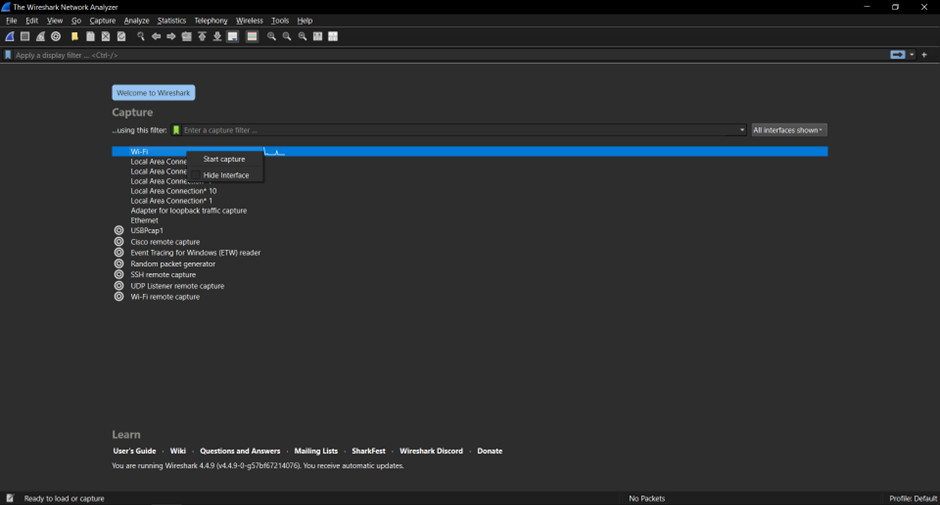
Figure 1 shows the Wireshark tool that displays multiple interfaces; the user selects the respective interface to capture the packets using a specific interface. Generally, a Wi-Fi interface is used to capture the traffic in a wireless network.
EXPERIMENTAL SETUP
In this, the two experiments were performed using the Wireshark tool as given below in detail:
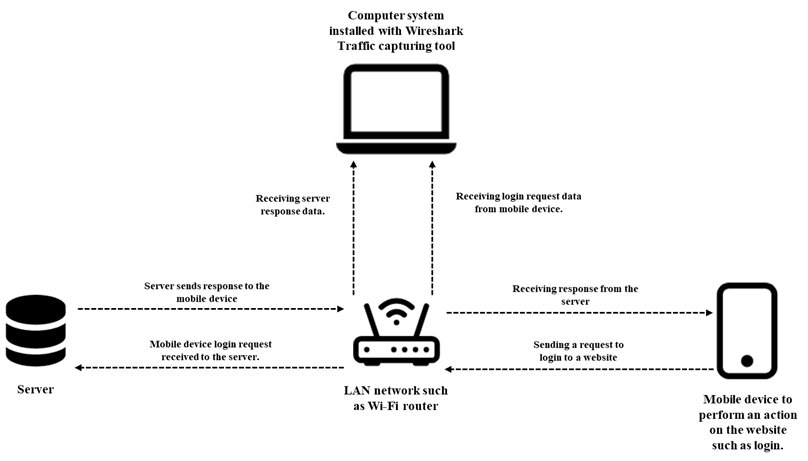
The First Experiment is to capture a website page’s traffic when a user logs in to their account. The Wireshark capture tool is running on the computer system; the user is accessing the website on their mobile device. Where the computer system and mobile device are connected within the same LAN network.
The architecture of the experiment setup is given below in Figure 2. In this, the main goal is to analyze and monitor the website when a user logs in to the website. This allows for monitoring the security of a website to identify whether there is password encryption is enabled or not when the user logs in to the website. Further, it is also used to identify whether users’ logins to the website are authentic or not.
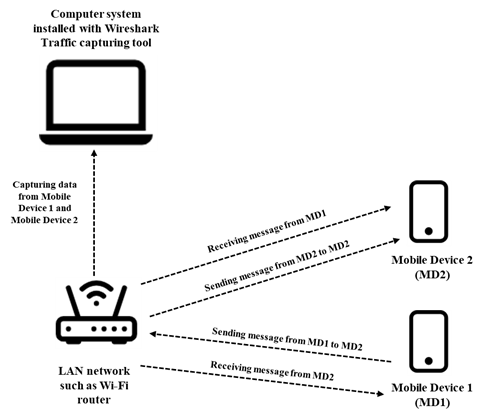
The Second Experiment captures the communication traffic between two users. The Wireshark capture tool is running on the computer system; user 1 has mobile device 1, and user 2 has mobile device 2. Both users’ mobile devices are installed with the same communication application, such as chat communication. The mobile device 1, mobile device 2, and computer system are connected within the same LAN network.
The computer system installed with the Wireshark tool captures the traffic of both mobile devices when users communicate with each other. The detailed architecture of the experiment setup is given below in Figure 3. In this, the main goal is to analyze and monitor how the communication is performed between the users, and identify whether there is message encryption between the users.
PERFORMING FIRST EXPERIMENT
In the first experiment, the random website login traffic was captured using Wireshark and the captured packets. The user visits the website, login and enters their login ID and password. If the entered login ID and password are incorrect, the website server does not authenticate the user. If the login ID and password are correct, the website server authenticates the user and allows the user to log in to the website, as shown in Figure 4.
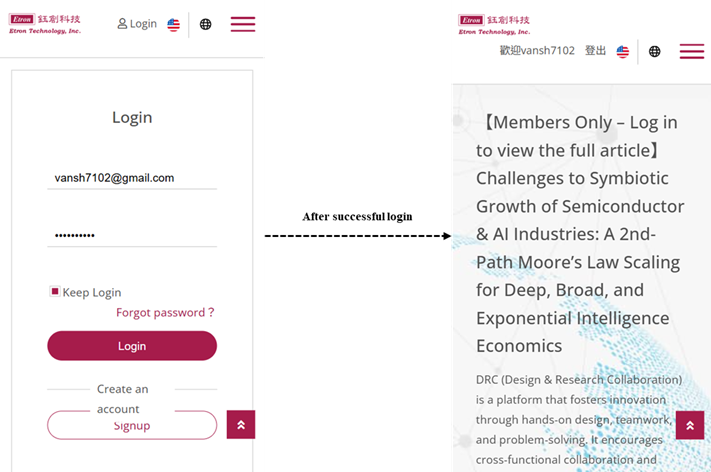
When the user logs in to the website, the Wireshark tool running in a network captures all the traffic between the source to destination and vice versa. The captured packets are used for monitoring and analyzing for further purposes. Figure 5 shows the Wireshark tool capturing the user login traffic.
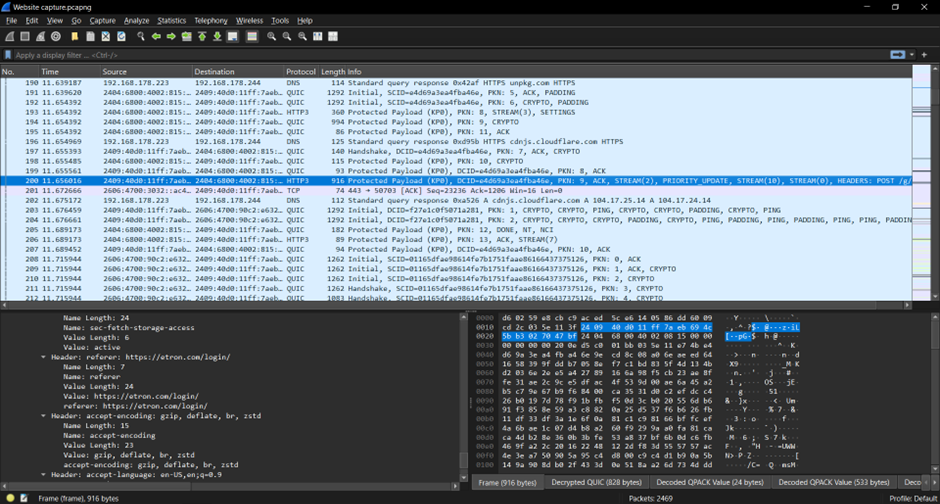
Figure 5 shows the Wireshark tools capturing the website traffic when the user logs in to the website. Here, the selected packet number 200 was analyzed, and the Wireshark tool captures the source IPv6 address from which the request is transmitted, such as a mobile device. The destination IPv6 address is the address of the destination server, such as a website server, where the request (such as a POST request method) is received from the source mobile device to log in to the website.
HTTP3 is the protocol used to exchange information on the World Wide Web (WWW). The information includes the data transmitted between the mobile device and the server. The information further includes response and request header information, such as request method, User-Agent, Cookies, server information, origin, referrer, etc.
PERFORMING SECOND EXPERIMENT
In the second experiment, the communication between two users, such as chat message traffic, was captured using Wireshark, and the captured packets were analyzed. In this experiment, both users use a chatting application (such as LAN Messenger) installed on their mobile devices. The chat application runs in the local area network where multiple users communicate through messages within the LAN network. The Wireshark tool is installed in a computer system connected to the same LAN network where the two user devices are connected. Figure 6a shows that the user device 1 communicates with the user device 2, and Figure 6b shows that the user device 2 communicates with the user device 1.
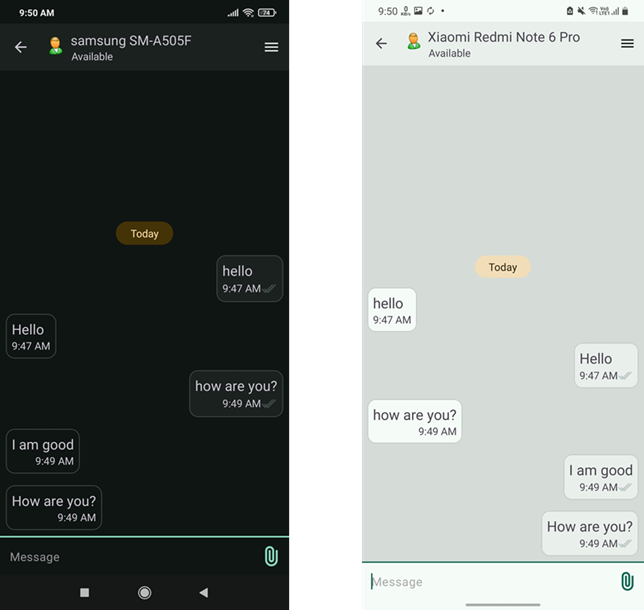
During communication, the traffic is captured for the user device 1 and user device 2 using the Wireshark traffic capture tool installed in a computer connected to the same network. Figure 7 shows the Wireshark tool capturing the traffic for two devices while chatting.
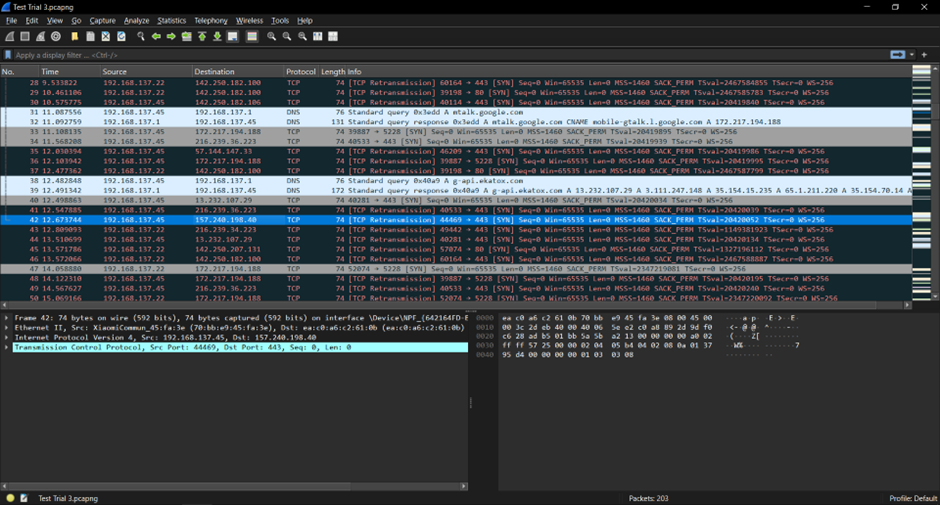
According to Figure 7, the Wireshark tool captures the messaging data for both the user devices. However, due to end-to-end encryption, the real message is encrypted in Wireshark. The figure shows that the source IP Address 192.168.137.45 is the address of user device 1 that sends the message to user device 2, which is transmitted via destination 216.239.36.223 using TCP protocol.
The source IP Address 192.168.132.22 is the address of user device 2 that sends the message to user device 1, that transmitted via destination 216.239.34.223 using TCP protocol. Deeply analyzing, the Wireshark tool also captures the device-related information, such as XiaomiCommun_45:fa:3e, communication interface such as Ethernet II. It also contains other information, such as detailed frame information, etc.
CONCLUSION
This blog mainly focuses on the experiments that were performed using the Wireshark packet capture tool. It also explains the basics of the Wireshark tool and the analysis of captured packets. It will also be useful in multiple sectors, such as security purposes, patent infringement tasks, reverse engineering tasks, etc. In the future, more experiments can be performed in different scenarios, such as in VoIP calling, using different Wireshark interface, and deep analysis of network packets.
REFERENCES
[2] https://www.spiceworks.com/it-security/network-security/articles/what-is-packet-sniffing/
[3] https://www.varonis.com/blog/how-to-use-wireshark
[4] https://fengweiz.github.io/19fa-cs315/labs/lab1-instruction.pdf
[5] https://www.geeksforgeeks.org/computer-networks/what-is-packet-sniffing/
[6] https://link.springer.com/chapter/10.1007/978-3-031-43140-1_18